

Coupon Redemption Guide
Date: 2026-03-14 18:00:12
Together We Run, Bound by Destiny
Greetings, Star Guardians.
This is
We would like to provide a guide on how to redeem coupon codes that can be obtained through various channels.
To celebrate the launch, the [WELCOMEORIGIN] coupon code was shared during the Launch Celebration Special Livestream, held alongside the PlayStation®5 and Steam Early Play on March 16 (Mon).
Follow the instructions below to redeem the coupon and claim your rewards!🎁
Please refer to the details below for more information.
✦ PlayStation®5 & Apple (iOS)
- Star Guardians using PlayStation®5 or Apple (iOS) devices can redeem the coupon by visiting the separate coupon webpage and entering the Account Info (PID) and coupon code.
* When entering your Account Info, you will be able to check the character nicknames created on each server under the account.
▶ Go to the Coupon Redemption Page
- Your Account Info (PID) can be checked and copied from [Settings (⚙️️)] → [Account].
1. While playing the game, select [Menu (☰)] at the top right of the game screen → then select [Settings (⚙️️)] from the icons on the left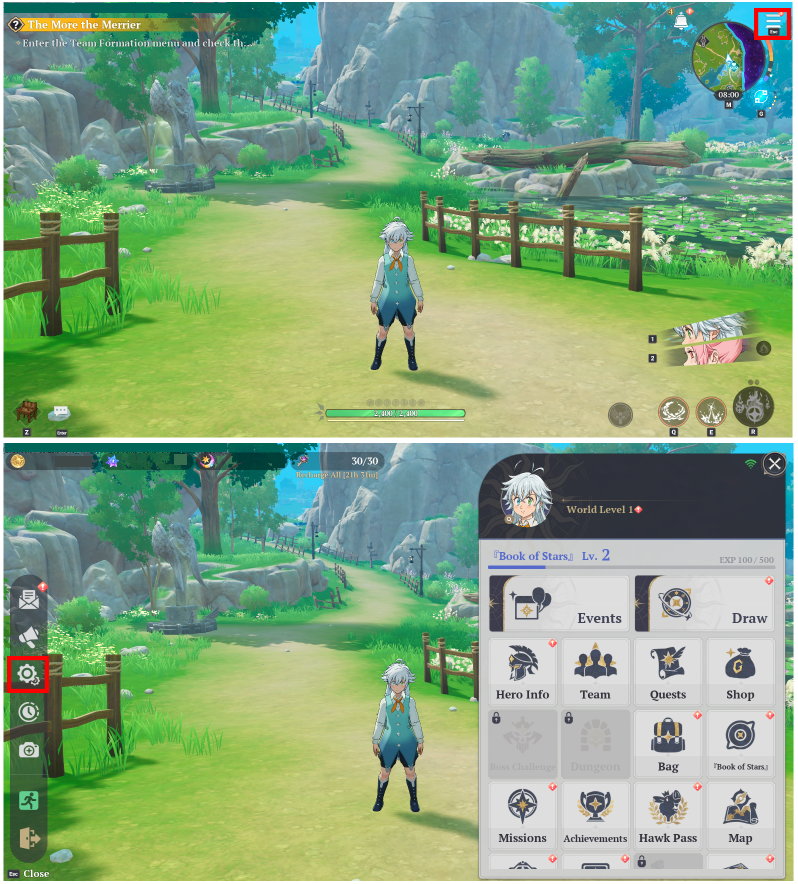
2. Select the [Account] tab to check and copy your Account Info (PID)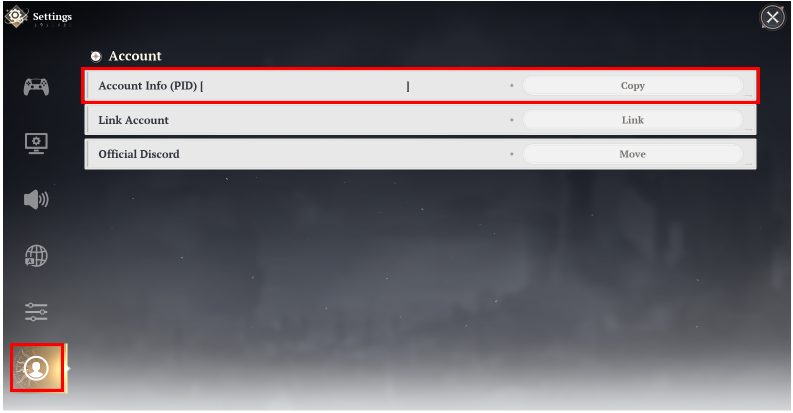
✦ PC & Android (AOS)
- Star Guardians using PC or Android (AOS) devices can enter the coupon code directly in the game and claim the reward without entering additional account information.
1. From the game screen, select [Menu (☰)] at the top right → select [Settings (⚙️️)] from the icons on the left
→ select the [Account] tab
2. Select the ‘Use’ button next to [Redeem Coupon], then enter the coupon code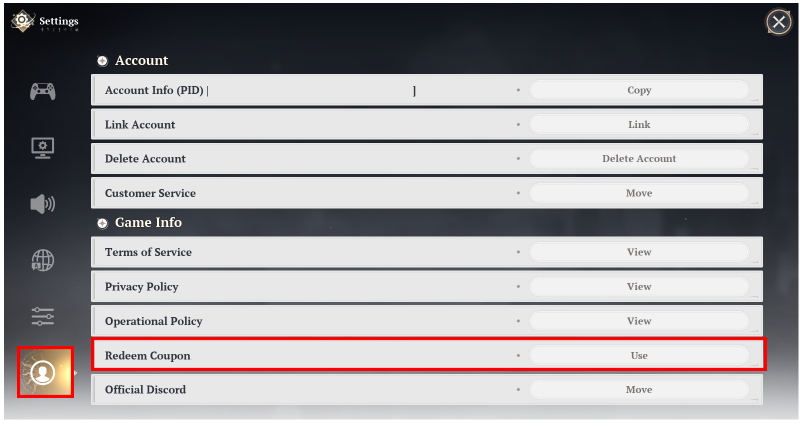
✦ Notes
- Rewards obtained through coupon codes can be claimed once per account and cannot be used multiple times across different servers.
- Coupons that have already been used or have expired cannot be redeemed.
- Coupon redemption cannot be reversed, so please make sure to check your server and nickname before using the coupon.
- Rewards will be sent to your in-game mailbox after using the coupon. If the reward does not appear, please log in again and check your mailbox.
- If you encounter any issues or have any questions regarding coupon redemption, please contact Customer Support.
Thank you.